

 Facebook
 Twitter
 LinkedIn
- Featured
- Export Emails to Sheets
- Screenshot Tool
- Email Tracker
- MailKing - automated mass emailing
- Save Emails as PDF
- Export Emails to Google Docs
- Multi Email Forward
- Meeting Scheduler
- Email Templates
- All Apps
- Gmail Label Sharing
- Auto Bcc for Gmail
- Mobile Text Alerts for Gmail
- Save Emails to Google Drive
- Save Emails to Dropbox
- Auto Follow Up for Gmail
- Backup and Archive Emails to Amazon S3
- Free Video Email
- Gmail Web Clipper
- Send your Email to SMS
- Gmail Snippets
- Gmail Phone
- Email Zoom Text Reader
- Gmail Screencast
- HTML Editor for Gmail
- Notes for Gmail
- Rename Email Subject
- Gmail Free Online Polls & Surveys
- Schedule Emails
- Snooze Emails
- Share Emails as Links
- Gmail URL Link Preview
- Gmail Time Tracker
- Free Email Tracking Blocker
- Save and Backup My Emails
- Attach And Share Cloud Files for Gmail
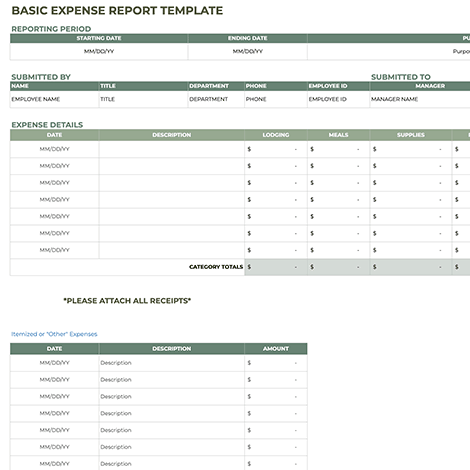
Effortlessly Track Business Expenses with Our Free, Professional Google Sheets Template

Tired of messy receipts and disorganized expense reports? Our free Itemized Expense Report Template for Google Sheets is the simple, powerful solution you need. Designed specifically for small businesses, entrepreneurs, and freelancers, this template helps you and your team track every dollar spent in a clean, professional format.

Stop wasting time deciphering handwritten notes or consolidating scattered spreadsheets. This ready-to-use template brings order and clarity to your financial records, making it easy to manage reimbursements for employees and contractors.

Key Features & Benefits:

All-in-One Expense Tracking: Log everything from lodging and airfare to meals, supplies, parking, and transportation in one organized sheet.

Fully Itemized List: Get a clear, line-by-line breakdown of all expenses, including date, description, category, and amount for complete transparency.

Flexible "Other Expenses" Section: Capture any out-of-the-ordinary costs that don't fit a standard category, ensuring no expense is forgotten.

Detailed Notes Field: Add important context for every entry—like the purpose of a meal or client meeting—so approvals and reimbursements are hassle-free.

Automatic Totals & Calculations: Built-in formulas automatically subtotal categories and calculate the final reimbursement amount, minimizing manual errors and saving you time.

100% Customizable: This Google Sheets template is fully editable. Add your company logo, create new expense categories, or adjust the layout to fit your exact business needs.

Cloud-Based & Collaborative: Since it’s built on Google Sheets, your team can access and submit expenses from anywhere, on any device. Real-time collaboration makes it easy to manage reports.

Who Is This Template For?

Small Business Owners managing employee reimbursements.

Freelancers & Independent Contractors tracking billable expenses for clients.

Startups needing a simple, cost-effective expense reporting system.

Team Leads & Project Managers overseeing project budgets and team spending.

Anyone who needs to get their business expenses organized without the complexity of expensive software.

How to Use This Free Template:

Click the link to open the template in Google Sheets.

Make a copy for your own Google Drive (File > Make a copy).

Customize the categories and add your company information.

Start logging expenses! Share it with your team for seamless submission and approval.

Ditch the clutter and embrace financial organization. This template eliminates the friction of expense reporting, allowing you to focus on what matters most—growing your business.

Download your free Basic Expense Report Template for Google Sheets now and take control of your business finances today!
Trusted By